Become a Instructor

Blogs

logotype
Menu
  • Courses
    • Salesforce Admin
    • Salesforce Developer
    • Salesforce BA Training
    • Advance Java Training
    • Buisness Analyst
    • Digital Marketing
    • Oracle DBA
    • QA Testing Course
    • SQL server Training
  • Register

+1-571 989 9489

logotype
  • Courses
    • Salesforce Admin
    • Salesforce Developer
    • Advance Java Training
    • Buisness Analyst
    • Digital Marketing
    • Oracle DBA
    • QA Testing Course
    • SQL server Training
  • Register
  • +1-571 989 9489

Become a Instructor

Blogs

logotype
Menu
  • Courses
    • Salesforce Admin
    • Salesforce Developer
    • Salesforce BA Training
    • Advance Java Training
    • Buisness Analyst
    • Digital Marketing
    • Oracle DBA
    • QA Testing Course
    • SQL server Training
  • Register

+1-571 989 9489

  • Courses
    • Salesforce Admin
    • Salesforce Developer
    • Advance Java Training
    • Buisness Analyst
    • Digital Marketing
    • Oracle DBA
    • QA Testing Course
    • SQL server Training
  • Register
  • +1-571 989 9489
logotype
logotype
  • Courses
    • Salesforce Admin
    • Salesforce Developer
    • Advance Java Training
    • Buisness Analyst
    • Digital Marketing
    • Oracle DBA
    • QA Testing Course
    • SQL server Training
  • Register
  • +1-571 989 9489
salesforce developer training Tag
Home Posts Tagged "salesforce developer training"

Tag: salesforce developer training

TECHadmin0 Comments
Share article:TwitterFacebookLinkedin
83 Views
4 Likes

How to Implement Robust User Access Controls in Salesforce for Better Security

Keeping your Salesforce data secure isn’t just about locking it all down; it’s about finding that balance between protection and letting people get their work done. The best organizations don’t treat access control as a checklist; they treat it like a strategy. If you’re diving into Salesforce developer certification, getting a handle on access control is one of the most useful, high-impact things you can do.

Here’s how the top Salesforce teams actually handle it.

Start Your Security Model from the Ground Up

First things first, understand your data. What do you have? Who owns it? Who actually needs to see it? In Salesforce, you sort this out using Organization-Wide Defaults (OWD). Set them to be as strict as you can, usually “Private” and then open things up bit by bit, and always for a reason.

This way, nothing gets exposed by accident. If someone can see something, it’s because you let them, not because Salesforce just handed them the key.

Use Profiles as Your Foundation, Add Permission Sets for Flexibility

One of the big mistakes one can do is stuffing profiles with too many permissions. If your target is the best Salesforce setups you must keep things clean. For example,

  1. Profiles set the minimum access someone needs for their job.
  2. Permission Sets give extra permissions only when they’re really needed.

You can also, instead of making ten profiles with minor differences, create one main profile and then hand out permission sets for things like report access or data imports. All these things make the situation easier to manage, keep your system safe, and grow smoothly with your team.

Rely on Role Hierarchies to Manage Data Visibility

Role hierarchies basically determine who can see whose data. A good hierarchy should reflect your company’s own structure without turning into a spider web. Keep it simple:

Sales reps see their own work

  1. Sales reps see their own work.
  2. Managers see their team’s work.
  3. Directors see things across a region.

Don’t get extravagant; too many layers can open up sensitive records where they shouldn’t be seen.

Get Specific with Sharing Rules

When teams need to work together, sharing rules becomes equally necessary. However, instead of opening access broadly, create targeted rules, for example one can share certain accounts with marketing or let finance see reports in read-only mode. Such small practices keep things collaborative, but always under control.

Lock Down Sensitive Data with Field-Level Security

Not all info in a record is equally important. Field-level security lets you hide or restrict really sensitive fields, for example, financial data, Iidentification numbers, private notes and more.

Even if someone can view a record, they might not need to see everything inside. If you’re studying for the Salesforce developer certification, understanding these layers is important as this is how it works in the real world.

Enhance Login Security with MFA and IP Restrictions

One of the points that usually gets overlooked is it doesn’t matter how tight your permissions are if anyone can just log in. To make the use of access controls robust, you must set up these 3 important things:

  1. Multi-Factor Authentication (MFA)
  2. IP restrictions
  3. Limits on login hours

These measures prevent unauthorized access, especially in remote or distributed teams.

Keep Reviewing, Auditing, and Updating

Access control isn’t a one-time project. Top teams keep an eye on essential aspects like user permissions, login activity, changes via Setup Audit Trail and more.

If someone leaves or moves jobs, update their access that day. Slow updates are classic security gaps.

Safeguard Integrations and API Access

Most Salesforce orgs tie in with other apps. Every integration is a potential back door, so try to use connected apps with strong security settings. Also, only give API access to the minimum data needed and regularly review what integration users can do.

If you are willing to join Salesforce developer training and placement, you’ll run into this a lot, both in training and real-world Salesforce work, because pretty much nothing runs solo these days.

Train Your Users, Not Just the System

Your fancy security won’t matter if your people don’t understand it. You must teach them about the essentials of keeping safe, like

  1. Good password habits
  2. Spotting phishing attempts
  3. Handling data responsibly

When users know the “why” behind the rules, they’re way more likely to follow them.

Final Thoughts

Robust user access control in Salesforce is all about intentional design. Start being necessarily restrictive, open things up carefully, and keep checking your work. The companies that do this right are not just safe; they build trust, keep things running smoothly, and set themselves up for secure growth. And if you’re aiming for a real career in Salesforce, you can master the knack of implementing robust access by joining Salesforce developer certification. It’s how you move from basic understanding to real expertise.

READ MORE
TECHadmin0 Comments
Share article:TwitterFacebookLinkedin
144 Views
15 Likes

Create Smart and Configurable Salesforce Alerts with the AlertFlow Banner System

Quick notification is the key to successful communication in an ever-changing business environment. Teams need to know about system changes, key announcements and operational alerts in order to stay up-to-date. Unfortunately, many traditional methods of notification, such as emails and generic messages, are easily overlooked. This is where the AlertFlow Banner System presents an innovative solution. AlertFlow is designed to deliver smart, configurable, and highly noticeable alerts through Salesforce’s user interface to allow administrators and developers to relay messages quickly to users with the goal of ensuring that users get the right message at the appropriate time without disrupting their workflow.

Through the Salesforce developer training, users learn to leverage systems such as AlertFlow to design user experiences that meet their users’ needs efficiently.

What is the AlertFlow Banner System?

The AlertFlow Banner System is a custom notification architecture that provides user-friendly notifications to users in the Salesforce platform. Instead of using outside forms of communication, AlertFlow gives companies the ability to create contextual banners that can be placed on various pages within the Salesforce platform.

Type of notifications can range from system updates to maintenance windows to compliance notifications to new feature rollouts or urgent changes in operation. Banners can be configured by an administrator or developer to fit different combinations of variables such as user role, specific object, page layout and/or time. This level of flexibility makes AlertFlow a valuable internal communication tool for organizations that rely on Salesforce for their day-to-day operations.

Key Features of AlertFlow

Below, we have enlisted some of the important features of AlterFlow:

1. Dynamic Alert Configuration

Dynamic Alerts are some of AlertFlow’s most powerful assets as they permit administrators and developers to set up alerts that automatically display based on predefined creation criteria. An example of this is when the company would display a warning banner when users access a specific record type or when a scheduled service maintenance is about to occur. 

This capability eliminates the need for administrators and developers to manually communicate the same types of information multiple times. Administrators and developers, during Salesforce developer training, are often introduced to conditional logic and configuration tools that help build such intelligent systems.

2. Targeted User Notifications

Not all alerts need to be displayed to all users. By providing targeted alerts, AlertFlow provides the means to assign specific alerts to specific roles, profiles, or Departments. For example, if a finance-related alert is displayed only to the finance team, and Technical maintenance alerts are only displayed to Systems Administrators, then this targeted method of communication will prevent users from receiving too much information and will result in the user receiving only the information relevant to them. 

3. Easy Customization and Branding

Banners through AlertFlow may be customized to suit any organization’s brand guide. However, colors, icons, message types, and placement of the banner can be changed to suit the organization’s needs or wants.

Some of the common alert styles may include:

  • Informational banners 
  • Warning notifications 
  • Success messages 
  • Critical alerts 

These variations help users quickly understand the importance of a message.

4. Scheduled Alerts

Scheduled alerts can also be useful to let organizations know (in advance) when maintenance will occur, when products will be launched, or when compliance deadlines need to be met.

Once the alert is scheduled, it will automatically display on the screen and disappear from the screen based on the time schedule that was set. Automating this process allows for automated reminders while removing the need for “manually” watching the schedule of alerts.

5. Seamless Integration with Salesforce

AlertFlow works side by side with Salesforce. It can be implemented as a Lightning Component, Custom Metadata, or a Configuration Driven Framework. It is built into Salesforce, so users won’t have to leave Salesforce to see the information they are working on.

Candidates who are pursuing the Salesforce developer certification usually study real-life business problem-solving via Salesforce customization as a part of their learning process and one such example will be the use of AlertFlow.

Benefits of Using AlertFlow in Salesforce

Organizations that implement AlertFlow experience several operational benefits like,

They improve internal communication: Important notifications get to users directly, removing reliance on emails and other messaging tools.

They increase user awareness: Users can see critical notifications about things like system downtime as they are occurring or know about compliance changes immediately and take action as necessary.

They enhance the user’s experience: Well-designed banner notifications provide helpful information to users without interrupting their workflow.

They reduce the number of queries: When users are informed about updates or known issues, they are less likely to raise repetitive support tickets.

For developers who are studying for their Salesforce developer certification, is a strong example of this balance that shows how creating a product will enhance the functionality and user experience of the application.

Best Practices for Implementing AlertFlow

To maximize value from AlertFlow, organizations should implement the following best practices:

  • Keep alerts brief- Users will quickly understand the alert message if the messages are short and to-the-point.
  • Color to show action/urgency- Use bright colors and symbols as visual indicators to convey urgency.
  • Target the right audience- Target alert delivery to users who need the alerts delivered to them.
  • Alert scheduling- Schedule alerts to be shown at the best times for your users.
  • Monitor alert performance- Track how users interact with alerts to improve future alert messages (refine alerts after monitoring their usage).

Developers who have completed Salesforce developer training can use this knowledge to more effectively implement these strategies in Salesforce.

Conclusion

The AlertFlow Banner system provides organizations with a smart approach to communicating updates inside Salesforce as well as how they provide configurable, targeted and visually clear alerts directly within the Salesforce platform; therefore, improving user understanding of the system and aiding in streamlining internal communication.

For developers and administrators, being able to implement an AlertFlow-type system illustrates a strong understanding of how Salesforce is customized and designed from a user’s perspective. These are essential skills for anyone who is pursuing Salesforce developer certification, as they show that someone can create effective and sustainable solutions to problems.

As Salesforce develops over time, the increasing importance of intelligent notification systems such as AlertFlow will become even more evident in helping organizations provide additional clarity between their teams, improve efficiency, and enhance teamwork.

READ MORE
TECHadmin0 Comments
Share article:TwitterFacebookLinkedin
194 Views
13 Likes

Salesforce Built-In Payment Processing: How to Handle Everything End-to-End

In the current digital economy, where online payments have become the standard for all, the capability to process payments right within your CRM can be a real game-changer. It simplifies business operations, improves financial analysis, and may increase conversion rates. Salesforce, the world’s most popular CRM solution, has excellent payment processing functionality from the point a customer checks out or is sent an invoice, all the way through to authorization and settlement. For today’s Salesforce experts, particularly those seeking Salesforce developer training or a Salesforce developer course, the know-how to create and control these processes is a must-have.

Now, let’s take a closer look at the subject at hand.

What Is Salesforce’s Built-In Payment Processing?

The built-in payment processing functionality of Salesforce enables businesses to process, capture, and manage payments right from within the CRM. This can be done either through native functionality (Salesforce Payments in some regions and versions of Salesforce) or through the integration of payment solutions and adapters that are part of the Salesforce family. With the built-in functionality, the entire payment process, which is linked to Salesforce data models and processes, can be managed from within the CRM.

From Salesforce documentation, payments within the system are managed through objects and APIs that handle tokenization, authorization, capture, and refunds as part of the commerce flow.

Why End-to-End Payment Handling Matters

A lot of businesses use two departments to complete their online sale transactions-Business to Business (B2B) or traditional eCommerce- and have to create and send invoices through Salesforce’s sales processing department while having the other department complete the payment service through a separate service provider/payment gateway; however, end-to-end has now removed these two separate departments by:

·   Housing all payment info in one central location: invoices, methods of payment and payments made (transactions) are managed through Salesforce; therefore, any company can access one single source for their payment-related activities.

·   Reducing the probability of human error: both authorizing & capturing each payment will now be automated with little to no human involvement; therefore, reducing the probability of future errors due to human interference.

·   Increasing the amount of receivables: using real-time status updates in conjunction with automated reminders will enhance cash flow sooner than traditional ways.

·   Increasing compliance levels: The existing payment service providers/gateways that have previously been integrated with Salesforce are now able to comply with established standards with regards to protecting customer-sensitive payment data within that organization’s CRM.

Examples such as FinDock and ChargeOn provide adequate evidence of how well Salesforce can successfully conduct and manage all transactions through a single source with the appropriate level of visibility and support multiple global payment providers.

Key Components of Salesforce Payment Workflows

To fully handle payments within Salesforce, developers can focus on the following components:

1. Payment Gateway Integration

The payment gateway is the bridge between Salesforce and external payment services (such as Stripe, Square, or Braintree). The Commerce Payment Gateway in Salesforce handles tokenization, authorization, capture, and refund API calls, all of which are necessary for securely processing payments from the customer’s credit card or bank account to your merchant account.

2. Tokenization and Security

Payment details should never be stored in Salesforce. This is where payment gateways come in, issuing tokens that represent customers’ payment details. These tokens facilitate secure authorization and capture of payments without exposing cardholder data.

3. Function for authorization and capture

Authorization is the function that checks if there are enough funds available. On the other hand, capture checks if the funds are successfully transferred from the customer to the merchant’s account. Salesforce payment APIs allow both authorization and capture functions to be performed as part of your payment/billing process implemented on Salesforce. This happens irrespective of whether you are using server-side or client-side programming, based on your requirements for security and performance.

4. Refunds, chargebacks, and reconciliation

An end-to-end solution should address post-processing activities, such as issuing refunds or processing chargebacks. This can also specify how to represent these activities in your Salesforce objects. You can use a product like FinDock to automate the reconciliation process, ensuring that your payment and accounting data remain in synchronized.

How the Salesforce Developer Course Can Help You Leverage This Knowledge

One thing is for sure, the experts who understand payment processing in Salesforce stand out in the market. After acquiring this knowledge, you can develop solutions that enable sales, finance, and technical teams to collaborate effectively. This is exactly what training for a Salesforce developer and Salesforce developer courses aim to achieve – to develop technical expertise and practical problem-solving skills.

If you are thinking of entering this field, learning about payment integration, automation in finance services, Apex programming for custom business processes, and API connectivity will increase your skills.

Conclusion

Payment processing in Salesforce is not just an advantage; it is an edge over the competition. With the entire process integrated into your CRM, businesses can accelerate cash flow, simplify sales cycles, and maintain up-to-date financial information without having to access multiple applications.

If you want to become a Salesforce developer, outstanding developer training is essential to accessing solutions to these payment systems and beyond. Once you gain the skills and knowledge needed to perform as a Salesforce developer, you will then have the expertise to help companies transform their payment processing with reliable, easy, and integrated payment processing into their Salesforce environment.

READ MORE
TECHinformation technologyadmin0 Comments
Share article:TwitterFacebookLinkedin
239 Views
1 Like

Explore Salesforce Security Checklist for Enterprises and Startups

Data security is no longer optional in today’s digital-first business environments. Protecting customer data, internal records, and business intelligence within Salesforce is key if you are a fast-growing startup or large enterprise. Of course, Salesforce is an impactful CRM, but its security heavily depends on its configuration, monitoring, and maintenance. This, therefore, calls for following a structured Salesforce security checklist that no business can afford to disregard.

Salesforce operates on a shared responsibility model. While the platform manages infrastructure-level security, organisations are responsible for managing user access, data visibility, configurations and compliance. One small misconfiguration can lead to serious data exposure, regulatory penalties, and loss of customer trust.

Speaking of Salesforce for enterprises and startups, let’s explore its importance and key points to be considered. 

Why Salesforce Security Matters to Enterprises and Startups

Large volumes of sensitive data are usually dealt with in enterprises, and this involves complex user hierarchies; thus, security governance is a priority. They also need to be compliant with regulations such as GDPR and industry-specific standards. 

Startups are a lot smaller, although they most often move very fast, and may not have formal security processes in place, which increases the risk of internal errors or unauthorized access.

A well-defined Salesforce security checklist keeps an organization proactive. It embeds security in daily operations and does not make it an afterthought.

Key elements of a Salesforce security checklist for Enterprises and Startups

1. User Authentication and Login Controls

Strong authentication is the first layer of defense. MFA (Multi-Factor Authentication) should be turned on for all end-users, including administrators. Password policies should enforce complexity, expiration, and reuse restrictions. One can also restrict login IP and configure trusted devices so as to reduce the possibility of unauthorized access.

Single Sign-On can also be implemented for central authentication, improving not only the security but also the user experience.

2. Profiles, Roles and Permission Management

The principle of least privilege shall be the basis for access at all times. Base permissions are defined by profiles, and permission sets should be granted in addition to profiles only when required. This helps to minimize overpermissioning and makes access management more scalable and auditable.

3. Data Sharing and Visibility settings

Salesforce also provides flexible controls over data sharing, however, it is very important to configure it mindfully. Other than this, it is necessary to set the Organisation-Wide Defaults (OWD) to the most restrictive level possible. As per the requirements of the business and startups one must use the role hierarchies, sharing rules, and manual sharing along with the borderline access.

Improper sharing settings are among the most common reasons for data disclosure.

4. Field-Level Security and Sensitive Data Protection 

Another essential element of Salesforce security for startups and enterprises is sensitive data protection, which can be achieved by field-level security. One would not want every user to view each of the fields. Field-Level Security ensures that sensitive information, including financial data, personal identifiers, and internal notes, is kept from unauthorized users. Advanced requirements might also rely on encryption and activity tracking utilities when it comes to advanced protection of critical data.

5. Secure Custom Development Practices

The fun part of the custom development for both the startups and the big businesses is it adds flexibility and can also introduces security risks if not handled correctly. All Apex code should enforce object- and field-level permissions. One must secure API integrations using authentication best practices. Along with this, the user inputs should always be validated to prevent vulnerabilities.

Secure development ensures that programmatic access does not bypass the existing security controls.

6. Monitoring, Auditing and Alerts

Detection of unusual behavior normally requires ongoing monitoring. Additionally, one cannot deny the importance of periodic review of login history, audit trails, and configuration changes. Another best thing you can do is set up alerts to notify administrators about suspicious activity, such as repeated failed attempts to log in or unexpected data access.

7. Data Backup and Recovery Planning

Backing the data up and planning the recovery is one of the most critical aspects of Salesforce security. Data losses can occur because of user errors or faulty integrations. Regular backups and tested recovery processes provide business continuity. This is particularly important for start-up businesses that are reliant on Salesforce as their system of record.

You can learn the same by joining the popular Salesforce Admin or Salesforce Developer Training offered by QuantoKnack Trainings and start a rewarding career.

Final Thoughts 

A comprehensive security checklist from Salesforce enables companies to grow without worrying, and provides Startups with a strong foundation, but does not involve risks that are just unnecessary. Security is not something which is completed once and ignored; instead, it is something on which experienced people consistently work and have shown their interest. Understanding what the platform offers and what kind of threats it is actually exposed to is crucial for every business, whether it is small or big. 

READ MORE
TECHArtificial Intelligenceadmin0 Comments
Share article:TwitterFacebookLinkedin
321 Views
15 Likes

From Developer to Expert: Must-Know Advanced Salesforce Developer Interview Questions & Answers

As Salesforce development evolves beyond just Apex triggers and flows, developers need to polish their skills and knowledge in scalable architecture, resilient integrations, airtight security, managing large data, and experience working on real-world enterprise problems. On the way to preparing for advanced roles like Senior Salesforce Developer, Platform Architect, Integration Specialist, or Technical Lead, you have to face Salesforce Developer Interview Questions loaded with different scenario-based, architecture-driven questions.

Here are some must-know advanced Salesforce Developer Interview Questions & Answers that will guide you on how to answer various problems under integration, security, authentication, governor limit handling, and large-scale data operations. These questions resemble those asked in real interviews for top companies hiring Salesforce talent.

​

Section 1: Core Apex, Limits & Enterprise-Scale Design

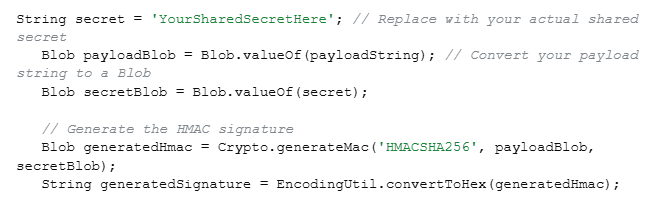
How can you ensure the payload hasn’t been tampered with by validating a signed request in Apex?

​Answer: We will follow 6 simple steps to ensure the payload hasn’t been tempered: 

  1. Look for signed request as it includes payload and signature
  2. Separate the actual payload data from the signature provided in the request.
  3. This way, we get the consumer secret or shared key that the sender used to sign the request. Secure it safely so only your Salesforce instance and the sending system knows it.
  4. Now, we generate a new signature based on the received payload in Apex using Crypto.generateMac()
image
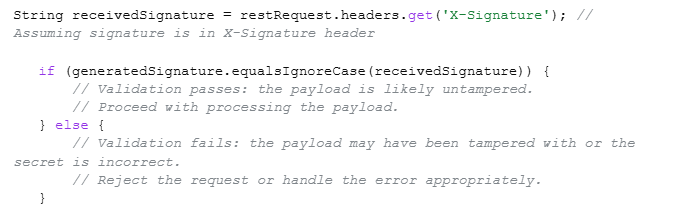
  1. Now, we compare the signature received in the request with the newly generated one.
image 1
  1. Matching signatures validates the request and is a green signal to trust and process the payload. However, unmatched signatures indicate to reject the request to fail tampering and incorrect shared secret.

This way, we can be sure that the original sender has raised the request and no one has modified it.

2. During JWT authentication, what are the common causes of “invalid signature,” and how would you debug them?

Answer: Some common causes of “invalid signature” can be:

  • Mismatch of the secret key between Salesforce and the identity provider.
  • An incorrect or a mistake in the JWT header or claim formatting.
  • Encoding of incorrect Base64Url.
  • Clock drift between Salesforce server time and provider time.
  • Using HMAC instead of RSA (or vice versa).
  • Trailing spaces or hidden characters in the token.
  1. To debug, we need to rebuild the JWT manually using Apex and compare it with working tokens.
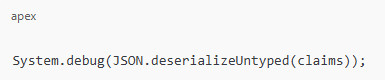
  2. Log decoded headers & claims using:
image 2
  1. Verify whether the exp, aud, and iss match according to the expectations of the providers.
  2. Use  JWT.io to compare your signature with the provider.
  3. For further details, we can enable “Debug Logs → Apex Callouts”.
3. You have to send confirmation emails to 1 M Contacts after a data migration. How would you design this without hitting limits?

Answer: Apex can’t send large-scale emails directly due to limitations.

So, to create a design without hitting limits, we need to follow the steps below:

  1. At the enterprise level, the most suitable is Salesforce Marketing Cloud or Marketing Cloud Connect.
  2. Also, we can apply the Single Email Message with Batch Apex and Email Relay.
  3. To design batches, we must keep 200 emails in every Batch, this way, we will only need 5,000 total batches, and then we can use the Database. Stateful to track the failures easily.
  4. We can use platform events and an external email service, such as SendGrid or Mailgum, for offloading extremely large email sends. Then the retry baked-in mechanism.
  5. To avoid sending double emails to contacts, we will store the “email sent” status to keep track.

This process can help guarantee scalability and avoid hitting governor limits.

Section 2: Integration & Reliability

4. If we need to avoid processing the same request twice, how will you handle the duplicate webhook in Apex?

Answer: We will go to the webhook request header and look for a unique identifier which will help to extract a webhook event ID effortlessly. Then we need to restore it so we will use Custom Object or Custom Metadata Cache for it.

For faster lookups, we can use Platform Cache, Before processing, check whether the event ID exists. If yes → skip.

Apex example:

if (WebhookEvent__c.get(eventId) != null) {

  return; // duplicate

}

We can ensure reliability by always designing webhook handlers as idempotent.

5. How will you manage the partial failures that Apex receives as per thousands of records per request received, ensuring no data loss?

Answer: First thing that we should do is to accept all records then immediately return a tracking ID and insert records using Queueable Apex or Batch Apex. For partial save, we use the Database.insert(records, allOrNone=false).

Collect failed results and store them in a custom object:

  • API Request ID
  • Failed record data
  • Error message

Build a retry process via:

  • Another Batch job OR
  • A scheduled job that picks failed rows.

Return structure to caller:

{

“requestId”: “api_2025_3344”,

“status”: “ACCEPTED”

}

This process avoids timeouts even during partial failures and saves records.

6. How would you ensure delivery if Salesforce sent data to an external API that goes down intermittently and is back online?

Answer: This is a classic resilient outbound integration problem. We can start by publishing your outbound payload as a Platform Event, and triggering it will send the callout. We can create a custom object in a retry query to store payload and error, using a Scheduled Apex Job so we can retry failed records every X minutes.

Additionally, we can add exponential back up that will retry failed records in every 3, 9, 12, 15.. minutes, helpful to complete data delivery even if the external API is offline for a long time.

Section 3: Authentication & Security

7. How do you handle external API’s SSL certificate rotation that happens every 3 months? How will you make it automatic in Salesforce?

Answer: Salesforce has an automatic process of validating API SSL certifications and even notifies if any of them are missing in the Remote site settings or named credentials chain. If we get any notification, we can start with Named credentials to manage the rotation first. So, we just have to take care if the external service uses a valid CA-signed certificate, as Salesforce will take care of SSL root and other certificates automatically. Also, we can utilize the Certificate Pinning for the changes noticed in the external service domain or certificate chain. 

8. If a third-party only supports OAuth 2.0 Authorization Code Flow, how will you integrate it with Salesforce? You have to authenticate it without manual user consent?

Answer: Without ongoing user consent, we need server-to-server access when a 3rd party only supports OAuth 2.0 Authorization Code Flow. We can obtain a refresh token by following the correct approach of one-time authorization with an admin. Then follow the simple steps:

Register Salesforce Callback URL with the provider > Run the normal authorization URL > Manual log in > Keep 3rd party shared authorization code and refresh token.

Afterwards, to automatically exchange the token for new access tokens without further human involvement in Salesforce, we need to store the refresh token inside a Named Credential securely. This way, callouts use the Named Credential every time and backstage, refresh token injects valid access tokens with the help of Salesforce. OAuth’s Authorization Code Flow needs minimum of one initial consent, but we can make the integration server-to-server & automatic with a refresh token.

9. How would you generate and refresh tokens securely from Apex if your external service uses JWT-based authentication?

Answer: We can get started with JWT header and claims (iss, sub, aud, exp) creation and signing up with a private key stored in a certificate in Salesforce.

Then generate a JWT:

Blob signature = Crypto.sign(‘RSA-SHA256’, Blob.valueOf(jwtHeader + ‘.’ + jwtClaim), cert.getPrivateKey());

Now, we will use platform cache & named credentials to post JWT to token endpoint and parse. This secures the access token, and we can even use Token exchange to set up an auto-refresh to update when expired.’’

Salesforce should not generate or sign JWTs as we are using middleware to securely handle JWT- based authentication so MuleSoft (Middleware) manages all JWT signing, token generation, and refresh cycles. It ensures that private keys never enter Salesforce. So, Salesforce Apex calls Mulesoft via Named credentials and gets an access token generated already. Salesforces help in storing this token information and expiration date temporarily in the Platform Cache or an encrypted field. Apex does not perform any cryptographic operations when the token expires; instead, it simply requests a new one from Mulesoft. It works in a pattern where all callouts include the token in the Authorization header, and 401/403 responses trigger an automatic refresh request that centralizes security in MuleSoft, reduces Apex complexity, and avoids exposing private keys in Salesforce.

Section 4: Bulk Data, Scalability, & Async Processing

10. How to design Apex code that processes 5 million records?

Answer: To efficiently handle such a large result set, like 5 million records in Apex, we can use Batch Apex with Database.getQueryLocator. We have to stay within CPU, heap, and callout limits, so we will keep the batch scope around 2000. Retrying can corrupt the data, so we have to bulkify the logic fully to keep them idempotent. Keep 4 things in mind while following this process: 

Keep SELECT fields usage minimal

Don’t use heavy computation in loops

Try performing DML in bulk

Capture partial failure with error logging (Custom Object or Platform Events)

Also, we can run multiple parallel batches on a disjoint set and even use data partitions, like CreatedDate ranges,etc, to speed up the process. Use AsyncApexJob to monitor performance and for selectivity, optimize queries with indexes.

11. How can we Bulkify REST API callouts?

Answer: We have 4 ways to Bulkify Callouts: 

  1. Batch up records, and to avoid hitting governor limits, we need to process them in separate Queueable Apex jobs. 
  2. Send a single payload of record IDs to a middleware. It helps in processing and interacting with external systems.
  3. Use an external system to process the records bya separate service. Just add the necessary details to the platform event and publish. 
  4. Keeping the current transaction in mind, implement logic for throttling API Requests.
12. How do you handle row locking issues (UNABLE_TO_LOCK_ROW)?

Answer: We can use parent ID to sort DML records and lock queries using FOR UPDATE. Also, we can use Limits.getDmlRows or Limits.getCpuTime to retry logic and avoid multiple parents in one transaction.

Section 5: System Design, Patterns & Best Practices

13. What is the best way to implement idempotent Apex logic?

Answer: To implement Idempotent design, we need to process the same request more than 2 times to get the same result. There are 4 ways to do this:

  1. Keep the expertanal ID unique
  2. Save request hash and avoid duplicates
  3. Utilize Platform Cache to use a lock system (Key = requestID).
  4. Always perform “incremental updates” after the thorough check up.
14. How do you design a multi-org integration hub connecting multiple Salesforce orgs?

Answer: We can use both Salesforce Event Bus (Platform Events) or Mulesoft / Integration Middleware. Each org publishes & subscribes to events that include routing rules, retry logic, dead-letter queue, and event versioning

15. How do you ensure transaction consistency across multiple async processes?

Answer: Follow these 5 simple steps to ensure transaction consistency across multiple async processes. 

  1. Process the order with Platform Events
  2. Avoid race conditions by applying “FOR UPDATE” row-level locking
  3. Implement state-based processing like state machines
  4. Handle retries safely with idempotency
  5. Coordinate multiple async processes with the Orchestration layer.
16. How do you protect Apex REST APIs from DDoS attacks or spam traffic?

Answer: We can use API keys and HMAC signature,s and Platform Cache counters to add rate limiting. Then we can Shield Event Monitoring to block IPs. Also, we can use AWS API Gateway or Cloudflare to add a reverse proxy.

17. How do you handle schema changes (new fields, deleted fields) in Apex so the system does not break?

Answer: We need to avoid hardcoded field names, using Schema.DescribeFieldResult and Custom Metadata for dynamic mapping. Also, we need to add automated tests to detect schema drift and utilize Dynamic SOQL to create flexible queries at runtime or Dynamic DML to create and manipulate records with fields or values that are unknown until runtime.

Conclusion

Hope these Salesforce Developer Interview Questions will add some confidence and knowledge to your basket. Also, you will get a glimpse of your preparation level according to the types of questions and scenarios asked during the interview. If you think you lack somewhere and need more training or practice to become an expert, this is your time to join our online Salesforce developer classes and get started to achieve great heights. We have instructors with years of experience and expertise in different sides of Salesforce. Also, you can get practical knowledge by working on live projects. And the bonus is that you can get placement assistance from our partnered organizations that look for expertise in different sectors of Salesforce. 

READ MORE
TECHArtificial Intelligenceadmin0 Comments
Share article:TwitterFacebookLinkedin
239 Views
6 Likes

How​‍​‌‍​‍‌​‍​‌‍​‍‌ Integration Errors Lead to Salesforce Data Loss and Ways to Fix Them

Salesforce is the hub of numerous organizational processes. It connects sales, service, marketing, support, and analytics. As companies continue to rely on automation and system interconnections, integrations become the lifeline. However, these integrations, if wrongly set up, if they are old or if they are not properly monitored, can be the cause of the most serious problems in a Salesforce environment – DATA LOSS. 

Knowing how mistakes happen and how to stop them is not only a must-have skill for teams but also a significant part of the Salesforce developer training and the Salesforce developer certification journey.

Let’s have a quick look at the details here!

How Integration Errors Begin?

In most cases, data loss during the process of integration is not something that happens suddenly. Normally, it starts with small technical gaps that silently exist. One of the frequently encountered problems is reaching the API limits of Salesforce. In situations where these limits are surpassed, the external systems may forcibly reissue the requests or send the incomplete payloads, which update or corrupt the records already stored in the database.

Data mismatch between systems also causes a problem. If the data in Salesforce fields is not structured in the same way as in the external system, then the integration can send the empty values, duplicates can be created without your knowledge, or if the mapping logic is wrong, information can even be deleted. This is particularly dangerous when flows, triggers, or third-party sync tools are used to update the related objects at the same time.

Data loss due to authentication failures is a thing as well. If tokens expire or permissions get changed, there might be some sync attempts that are partial, and as a result, Salesforce will have incomplete records. Sometimes developers make a deployment of integration updates in production without sufficient testing, thus the overwrites happen unexpectedly.

Mistakes made by people worsen the situation. Too many access rights, wrongly set field-level security or unnoticed validation rules are some of the things that create holes in your security through which integrations can unintentionally take advantage of them.

The Real Impact of Data Loss

Data loss in Salesforce is not just about the deteriorating quality of the database. The problem extends to every team that depends on the info being right. The sales teams might lose the history of leads or the updates of opportunities, thus new deals might take longer to close, and the follow-up might not happen on time. As a result, service teams may lose case notes, and thus they will have a hard time understanding and solving customer issues. Marketing becomes weaker because automations fail or send wrong messages.

Even the tiniest loss can result in incorrect numbers showing up on the dashboards and forecasts thus bad decisions being made by the leadership. Since Salesforce is often considered the only source of truth, corrupted or missing data becomes a huge problem for compliance, operational efficiency, and customer satisfaction. The process of restoring the lost relationships or recreating datasets costs time and can cause a financial as well as a reputational loss.

How to Prevent Integration-Related Data Loss

Before companies can really take advantage of Salesforce, they have to put in place strong protection measures that ensure their data is safe during integrations. A lot of data issues originate from the external systems, bad mapping, or from not monitoring and not from Salesforce. By adhering to disciplined practices and implementing proactive checkpoints, teams can almost eliminate the risk of accidental overwrites, mismatched records, and sync failures. That is the reason why knowing the best practices of integration constitutes a vital part of Salesforce developer training. Below are some of the measures by following which you can prevent integration-related data loss.

Strengthening system monitoring: 

  • This involves making use of Salesforce resources such as Event Monitoring, Setup Audit Trail, and Health Check.
  • Keeping a record of API calls, sync failures, and unauthorized access.

Adopt a disciplined development lifecycle: 

  • Every integration should be tested in a sandbox before going live.
  • Employ version control for managing changes in configuration and code.
  • Use defined pipelines and peer reviews for completing the task.

Create strong data mapping rules

  • Every field’s usage should be explicitly defined.
  • Data types should be accurate, validation rules and picklist limitations should be used correctly.
  • Applying field-level security will prevent integrations from changing sensitive data.

Implement detailed logging and alerting

  • Record the mistakes instead of letting the integrations fail quietly.
  • Let the notifications be set for rejected updates, partial syncs, and authentication issues.
  • Study the patterns to be able to fix the same issues before they recur. 

Performing regular system audits

  • Evaluating connected apps and API usage every three months.
  • Inspecting role permissions, workflows that are not being used, and apps that are outdated.
  • Getting rid of the inactive integrations that are risky.

Combining monitoring, organized development, robust mapping, and frequent audits gives organizations a lot more stable and trustworthy integrations. These practices not only safeguard really important data but are also a great support for the teams’ long-term scalability, which is a must-have when going through the Salesforce developer certification journey.

Creating a Culture That Protects Data

Apart from the technical measures, a proper team culture is also very important. It should consist not only of documentation and continuous learning but also of responsible access management. When teams realize the value of accurate data and perform the same procedures, the chance of accidental data loss can be easily eliminated.

This​‍​‌‍​‍‌​‍​‌‍​‍‌ is the moment where proper skill structuring becomes something that can be used. Developers who are part of the Salesforce developer training program stay updated with best practices, integration patterns, and error-handling methods. Besides that, obtaining a Salesforce developer certification empowers a developer to create stable, strong systems that protect the data at every stage.

Final Thoughts

Finally, we can say that integration errors may surely be small at the beginning, but they have the potential to become quite troublesome if no action is taken, as we learned from the information above. Recognizing the causes of integration errors and implementing strong monitoring, testing, and governance, teams act as a shield for their Salesforce environment against these unwanted data losses. When they are accurately added with the right knowledge and training, teams can easily produce more reliable integrations in order to make sure that Salesforce stays a super secure and trustworthy source of ‍​‌‍​‍‌​‍​‌‍​‍‌information.

READ MORE
information technologyTECHadmin0 Comments
Share article:TwitterFacebookLinkedin
218 Views
5 Likes

A Complete Guide: What Is a Record-Triggered Flow in Salesforce?

Salesforce has brought dramatic changes in how businesses handle automation, efficiency, and customer engagement, and has taken it to the bright side. Among its many intelligent tools, one stands out because of its power and effortless usability, and that is the Record-Triggered Flow. Loaded with these astounding features, everyone’s willing to get hold of it, whether it’s an aspiring professional enrolled in a Salesforce developer course or an experienced administrator refining their automation skills. Understanding how a record-triggered flow works is essential in today’s Salesforce ecosystem.

What is Record-Triggered Flow?

Record-Triggered Flow is one of the most powerful types of automation in Salesforce that a user does not have to manually start as it is always running in the background and reacts to the addition, modification, or deletion of a record in the system by itself. Another way of looking at it is that it is a set of commands that direct Salesforce to execute particular operations only when certain criteria are satisfied. 

For example, if a new Lead is created, Salesforce can instantly assign a new lead to a sales professional, send a welcome email, or update a linked record, and that too without a blink. The system handles all these operations immediately in the background instead of manually, which is time-saving and also ensures that the work is done correctly, consistently, and ​‍​‌‍​‍‌​‍​‌‍​‍‌efficiently.

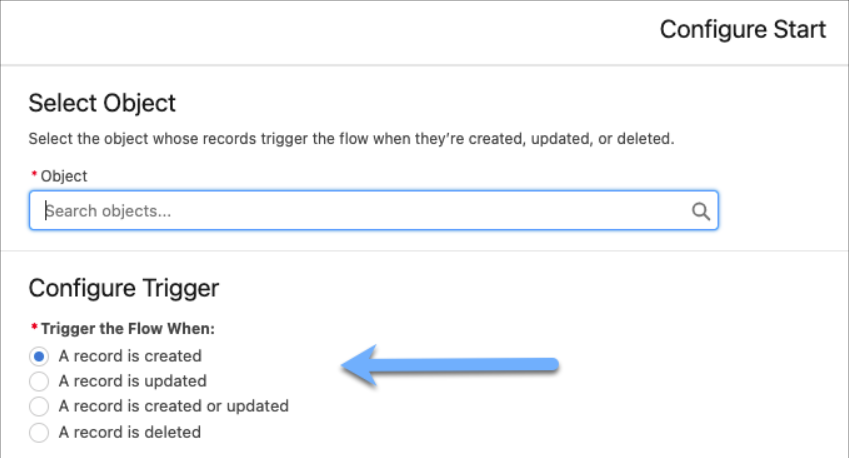
salesforce developer classess

Source: Salesforce blogs

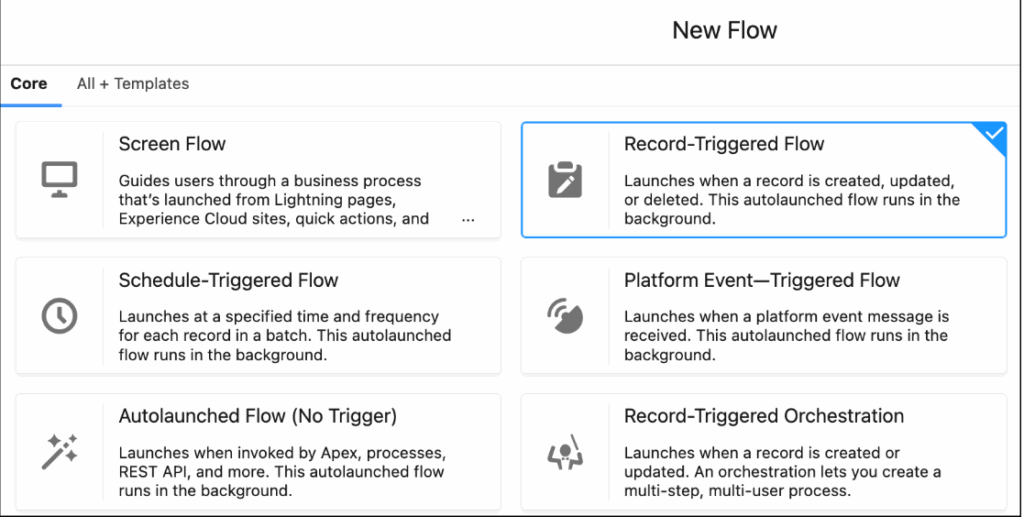
The​‍​‌‍​‍‌​‍​‌‍​‍‌ flow was built via Flow Builder, which is a no-code automation tool of Salesforce that is based on a simple drag-and-drop interface and may be used effectively by developers and administrators for the creation of complex processes. By removing the requirement for traditional Apex coding in numerous business cases, it is accessible even to those with minimal programming ‍​‌‍​‍‌​‍​‌‍​‍‌skills.

salesforce developer cerrification

Source: Salesforce blogs 

How Record-Triggered Flow Works?

Changes to a record affect how a record-triggered flow works. The process starts with a trigger event, such as adding and changing a record. Salesforce then checks to see if the record meets certain requirements. If the conditions are met, the flow will do a series of tasks that you have set.

Think about a chance that moves on to the “Closed Won” stage. A record-triggered flow can create a task for the customer success team, update the revenue total, and send an email to the finance department without any human involvement. Making the whole process faster and more accurate without any help from people

Types of Record-Triggered Flow?

Salesforce has two main types of record-triggered flows. It is very important to know when to use each type of flow in order to design efficient automation. One can easily learn these skills in the Salesforce developer training programs. 

In the automation sequence, each of these flows is assigned a particular task: 

  • Before-Save Flows (Fast Field Updates): These flows are initiated before the record is saved in the database, making them perfect for assembling quick changes to the same record. While doing so, it accelerates performance and consumes fewer system resources. 
  • After-Save Flows (Actions and Related Records): These flows are executed after the record is saved and are therefore utilized for actions that require the record to be in the database first, such as sending notifications, creating related records, or updating multiple records.

What is the Importance of Record-Triggered Flow?

Gradually, Salesforce is replacing the old automation tools, such as Process Builder and Workflow Rules, with Flow Builder. This switch means that record-triggered flows are not just another feature; they represent the future of Salesforce automation. 

Here are some of the reasons that show the importance of the Record-Triggered Flow: 

  • Help you with the automation of complex tasks without the need for coding. 
  • With the advent of before-save flows, you can see a great improvement in performance. 
  • It also provides developers and admins with more alternatives for handling logic in one place. 
  • It further guarantees that data is accurate by reducing the number of errors that are made manually. 
  • The best feature of the record-triggered flow is its compatibility with the roadmap of Salesforce.

In case you want to be an automation expert, mastering the use of flows is a crucial step for anyone enrolled in a Salesforce developer ‍​‌‍​‍‌​‍​‌‍​‍‌course.

How to Learn Record-Triggered Flow

If you are a developer in a Salesforce ecosystem and you want to raise your knowledge, you can learn to optimize record-triggered flows. You can get the finest understanding of it by joining the professional Salesforce developer training course. This program will help you understand how to:

  • Create flows with Flow Builder. 
  • Using Apex to connect flows and get more advanced features. 
  • Design triggers and conditions easily and effectively.

Conclusion

I hope the article has helped you understand that Record-Triggered Flow is one of the major upgrading and transformative factors for Salesforce automation processes. By decreasing human intervention and ensuring that all operations run smoothly in the background, they become more efficient. 

So, if you want to boost your knowledge in Salesforce, then you should check out Salesforce developer courses at Quantoknack Training. They offer the best Salesforce developer training programs, which will help you become an automation expert by gaining a deeper understanding of flow design and start a rewarding career. 

READ MORE
TECHArtificial Intelligenceadmin0 Comments
Share article:TwitterFacebookLinkedin
492 Views
5 Likes

Breaking into AI: Skills, Courses & Career Tips for 2025

Everyone has heard about AI, its effect on technology, its growth potential, and a lot more. But the biggest challenge is to include it in your career and day-to-day work, which can not only make your work easy but also create great value in the industry. That’s why most of the talents may lose their jobs or get stuck in their career. In 2025, online Salesforce AI training can make a great change in your life. This is not a workshop or simple AI tool utilization course like you may in ads over social media. This attains great potential in future as Salesforce is launching its own AI tools that can make a great difference in the CRM work.

Many organizations seek and hire talent who acquire knowledge and skills in AI for better growth and automation of a lot of processes in the organization. It is very important that you understand everything about the AI skills and courses available that can help you grow your career in 2026 and beyond, as well as get some expert tips to get started. This article will guide you as a beginner and professional so that you can make a great hike in your career.

Future-Ready Skills that You’ll Learn

  • AI fundamentals and ethical AI use
  • Prompt engineering and Copilot Studio
  • Building and deploying AI agents with AgentForce
  • Hands-on workshops and instructor-led sessions in global AI Centers
  • Practice Salesforce languages – Apex
  • Other key languages and technologies include JavaScript for UI, Lightning Web Components (LWC) for modern web interfaces, Visualforce for older UI development, and query languages like SOQL and SOSL for data retrieval.
  • Master Machine learning and deep learning
  • Get some hands-on experience Einstein 1 Studio and Einstein Generative AI
  • Learn to create and interact with large language models with Gen AI and Prompt Engineering.

Certifications Available

  • Salesforce Certified AI Associate
  • Salesforce Certified AI Specialist
  • Salesforce Developer Training (CRM & AI Learning)

Skills You’ll Gain with online Salesforce Developer training

  • Apex programming and trigger development
  • Lightning component creation
  • Salesforce API integration
  • Data modeling and security implementation

Career & Professional Tips

  • Gain Experience: First of all, you must have practical knowledge of various case scenarios that you will require to solve various problems for your organization. And for that, these online Salesforce AI training courses provide hands-on experience on various live projects so that you can become a master in the field.
  • Build a Strong Portfolio: You have to keep all your work as a portfolio to tangible prove your skills and knowledge to the organization. Platforms like GitHub can help you showcase your projects so that the interviewers can understand what you know better.
  • Network Strategically: It is easy to connect with experts and other learners over online forums, meetups, and conferences. This way, you can share and even ask problems to people all around the world in the same field. You will get various possible solutions for various kinds of case scenarios.
  • Focus on Business Value: You have to understand the business demand and then understand how AI can solve such real-world challenges. This way you can make the most out of your skills, giving more valuable results.
  • Stay Up to Date: Staying updated is the most important thing for everyone. Keep an eye on all the latest updates that Salesforce shares regarding AI and other tools. This will help you come up with more advanced solutions for every department. You must continuously follow industry news, read research papers, and keep up with new trends.
  • Prepare for Technical Interviews: The online Salesforce developer training courses include mock and practice tests that help you check your knowledge and even prepare you for your job interview. You will be trained in Salesforce via various coding challenges and case studies relevant to your AI roles.

How to Get Started

  • Visit Trailhead and enroll in AI-specific modules
  • Join online Salesforce AI training with QuantoKnack training.
  • Learn in live sessions by experts, ask your doubts and get solutions without hassle.
  • Practice with mock tests and other series to polish your skills and knowledge.
  • Earn badges and certifications to showcase your skills as we will help you prepare for your Salesforce developer exam.

So, what’s your choice in 2026? How are you going to start your career journey in 2026?

READ MORE
Artificial Intelligenceinformation technologyTECHadmin0 Comments
Share article:TwitterFacebookLinkedin
583 Views
16 Likes

Turn Code into Career: Boost Opportunities with a Salesforce Developer Course

Coding is often considered the most enjoyable skill for many students. However, many of them don’t know how to start, and some who do get started often become stuck in complex programming languages, which leads them to abandon their tech dreams. That’s why various individuals prefer Salesforce, particularly those who love to code and want to start their career in it, as it doesn’t require heavy coding and has its own programming language. Many Salesforce developer courses online train students in the same way. They equip every individual with valuable skills and knowledge that provide a pathway to becoming a sought-after professional in the Salesforce ecosystem. It offers numerous career opportunities and the potential for high earnings. 

How can a Salesforce Developer course help you?

There are a lot of benefits you can get by enrolling in an online Salesforce developer course. Here are some major perks you can enjoy!

  • Develop Essential Skills

In such Salesforce developer courses, professionals teach and train students in programming fundamentals, software development lifecycles, and Salesforce-specific skills, like Apex and Visualforce. Students learn custom development and customization features to create systems for organizations as per their business needs.

  • Gain Certification

You can prepare for Platform Developer I and II certification with the help of the mock tests and other questionnaires prepared by the experts. It helps students identify where they lack and where they need improvement. After practicing and getting good results, you can take the Salesforce developer exam with the confidence of getting your certification, demonstrating your expertise, and validating your knowledge to potential employers.

  • 24/7 Customer support

You can always reach out to the experts for help, no matter if you have any questions related to the Salesforce developer course or topics included in your curriculum. Get solutions to all your problems just by asking it anytime you want.

  • One-on-One Doubt Clearing

You can also get the chance to interact one-on-one with the experts and get a detailed answer to your every question. Hence, you won’t be waiting to search any information online or looking to get the solution in various material resources.

  • Real-Time Salesforce Platform-Related Use Cases.

The highlight of these online Salesforce developer trainings courses is the opportunity to work on various live projects. Yes! The training providers like QuantoKnack training have partnered with organizations that offer live projects to the students for their experience. They create the entire system as per the specified requirements and handle it from start to end with the help and guidance of the experts.

  • Flexible Learning

Most students who start their Salesforce journey are students or working professionals looking to make good growth in their careers. That’s why taking regular offline classes at a fixed time can be difficult for them. They need a more flexible solution where they can get the chance to learn from anywhere, anytime. It includes a lot of live sessions and even recordings of these sessions so that students can learn with flexibility.

  • Enhance Your Resume

Whenever you apply for a job or seek a promotion at your current organization, it is essential to upskill your knowledge and potential. And above that is to attain a certification in it to prove your skills and get more preference than the others in the industry. You can simply achieve that by adding Salesforce developer skills and certifications to your resume. It will make you a more competitive candidate for job opportunities. 

  • Expand Career Opportunities

Various organizations in the USA offer job opportunities in various fields of Salesforce. You can start with Salesforce Developer I and then expand your career growth with other certifications like Admin, Business Analyst, Quality Analyst, Junior Developer, Senior Developer, and Salesforce Architect.

  • Increase Earning Potential

If you think about what a certification can do for salary hikes, the answer is a lot. A certified Salesforce developer earns a lucrative salary, especially as they gain experience and specialize in niche areas like LWC development or Salesforce Commerce Cloud. 

  • Network and Connect

You can connect with other developers and industry professionals in the online Salesforce developer training course community. These worldwide famous experts can lead to job referrals and collaborations.

Examples of Salesforce Developer Roles

  • Salesforce Developer: Customizes and develops applications, integrates systems, and builds new solutions. 
  • Salesforce Administrator: Manages the Salesforce platform, user access, and data. 
  • Salesforce Consultant: Offers expert advice on implementing and optimizing the Salesforce system. 
  • Salesforce Solution Engineer: Designs and implements Salesforce solutions based on client needs. 

In Conclusion

You can rely on the QuantoKnack training online, which offers the best Salesforce developer training course in the USA. Students can study with live and recorded Salesforce developer classes that will increase their knowledge and skills. You can always get real-life experience with the live projects to help you make yourself more eligible for the job opportunity. Also, we assist you with the job placement, as many organizations partner with us to hire the best talents from our training program. So, enroll today and get started with your career!

READ MORE
TECHArtificial Intelligenceadmin0 Comments
Share article:TwitterFacebookLinkedin
813 Views
24 Likes

From Automation to Intelligence: Why Salesforce AI Training Matters Now!

The AI integration in Salesforce has empowered organizations to predict and get more success in business. The Salesforce AI training can help developers & admins to create a more seamless workflow for the entire organization. The repetitive tasks, insights personalized for a specific task, prediction for proactive actions, and many more advantages of integrating AI in the Salesforce environment increase the demand of AI skills in the market. Now, both AI and Salesforce are going hand in hand so it is very important for every individual to learn and create a better experience for the organization & employees, and for users. 

Let’s understand this in a better way. How can your Salesforce AI training make a great difference for your career as well as the organizations you will work for? Why is Salesforce AI training a must in today’s time? 

5 Reasons Why Salesforce AI Training Matters!

Here are 5 reasons to better understand the demand & need for Salesforce AI training in 2025 and the upcoming years for both business and career growth.

1. Enhanced Efficiency and Productivity:

Automated Tasks: AI tools help to manage all the repetitive tasks that require daily attention but can be simply handled by automation. Whether lead scoring, data entry, or case routing, all can be automated with the right AI tool that can free up some more time for the employees to focus on strategic work and increase their work efficiency.

Improved Workflows: From departments to teams, many workers rely on each other and need to interconnect and collaborate for work even outside of their departments. AI tools can streamline workflow accordingly, helping various departments to interact and connect for any requirement.

2. Better Customer Experiences

Personalized Interactions: It is very important to understand your customer and provide them with insight and information as per their data and behavior. You can use AI tools to create personalized recommendations and targeted marketing campaigns.

Improved Customer Service: Organizations can make the customer experience more seamless simply by adding various FAQs and responses in advance to the AI-based chatbots with automated support systems. This way, users will get instant responses to their queries with personalized solutions with the help of AI.

Predictive Insights: Now, you have the analysis reports shared by the AI tool but how will you observe it and understand the customer needs and issues? For this also, you can reach out to the AI system, as they have the power to understand what a customer wants and offer proactive solutions to them. This will create stronger relationships between the organizations and users.

3. Data-Driven Decision Making

Actionable Insights: All you need to do is keep all your data in one place, attached to your AI tool. It will analyze the vast amount of data for you and provide actionable insights for making well-informed business decisions.

Predictive Analytics: Not only what has happened, but you can also get predictions for the future. AI tools offer forecasts analyzing the pattern of sales, trends in the market, and challenges most likely to appear. This identification and prediction allow organizations to develop proactive strategies and be ready for different kinds of consequences.

4. Staying Ahead of the Competition

Competitive Advantage: The most important thing in business is to keep an eye on what your competitors are doing and stay ahead with more latest technologies to beat them in the race. Utilizing AI gives organizations a competitive edge as you can optimize the processes, enhance your user experience, and even make more informed decisions for various business problems.

Future-Proofing: While planning and adapting to any technology, it is imperative for organizations to understand the AI evolution and how it can change the market in the future. It is very important to understand the importance of AI.

5. Importance of AI Training

Adoption and Integration: No matter how organizations understand AI tools, it is your duty as an AI expert to tailor the complete strategy as per the company’s requirements. With Salesforce AI training, you will become a gem for organizations that want to implement tools like Salesforce Einstein and Agentforce into their system.

Mastering Tools: As a certified Salesforce developer or admin, you have to attain success in learning and mastering the various AI tools in the Salesforce environment. It will increase your value in the organization and even help you in creating more aligned strategies to customize the system as per the organizational needs.

Future-Ready Workforce: AI is thriving in the 2025 era and is more likely to evolve and demand in the future. The features like automation, analysis, accurate predictions, seamless workflows, and other assistance to the business in maintaining customer relationships, will give you a great future in the AI career. This technology will grow and so will your career.

Final Thoughts

This is why you must complete your Salesforce AI training to pave a successful career. For organizations, you will empower the people from operations to customer experience and competitive edge. Optimization and enhancement in this rapidly evolving technological landscape will change the business value, becoming a valuable asset for them. You can ensure a great appraisal and higher salary expectations than other technologies in the field. All you need is to complete a Salesforce certification, in which QuantoKnack training will help you for sure. 

You will get sessions from experts who have years of experience as well as knowledge that can help you understand the complete area of topics and prepare better for your exam. Not only this! You will also get mock and practice tests that will help you highlight the areas where you lack and the areas where you are good at. This way, you can focus on the weak areas and work better for it. After completing your Salesforce AI training and certification, you will also get assistance for job placement. Our partnered companies offer jobs at their highly reputable companies with a higher salary package.

In short, Salesforce AI training can be the best way to kickstart your career journey in Salesforce and become a valuable asset.

READ MORE
  • 1
  • 2
  • 3
Recent Posts
  • Step-by-Step Guide to Becoming a Salesforce Business Analyst
    The Salesforce ecosystem is booming, and companies are looking...
  • How to Implement Robust User Access Controls in Salesforce for Better Security
    Keeping your Salesforce data secure isn’t just about locking it...
  • Common Errors in Salesforce Data Loader and How to Fix Them
    Using the Salesforce Data Loader seems simple at first, until...
  • Create Smart and Configurable Salesforce Alerts with the AlertFlow Banner System
    Quick notification is the key to successful communication in an...
  • How Salesforce Revenue Cloud Is Transforming Quote-to-Cash Processes
    Businesses have always been under the constant pressure of...
logotype

We cater to individuals and corporates and provide IT training and certification programs.

44679 Endicott Drive Suit 300 #1046 Ashburn, VA 20147 United States

Phone: +1-571 989 9489

Email: atul.deo@quantoknack.com

Useful links

About Us

Contact Us

Blog

Courses

  • Live Salesforce Admin Training
  • Business Analyst
  • QA Testing Course
  • Advance JAVA Training
  • SQL Server Training
  • Live Salesforce Developer Training Certification Course
  • Digital Marketing
  • Oracle DBA Training

Subscribe

    Facebook
    Instagram Pinterest Linkedin
    Logo star

     2026 Quantoknack. All Rights Reserved