


From Developer to Expert: Must-Know Advanced Salesforce Developer Interview Questions & Answers
As Salesforce development evolves beyond just Apex triggers and flows, developers need to polish their skills and knowledge in scalable architecture, resilient integrations, airtight security, managing large data, and experience working on real-world enterprise problems. On the way to preparing for advanced roles like Senior Salesforce Developer, Platform Architect, Integration Specialist, or Technical Lead, you have to face Salesforce Developer Interview Questions loaded with different scenario-based, architecture-driven questions.
Here are some must-know advanced Salesforce Developer Interview Questions & Answers that will guide you on how to answer various problems under integration, security, authentication, governor limit handling, and large-scale data operations. These questions resemble those asked in real interviews for top companies hiring Salesforce talent.
Section 1: Core Apex, Limits & Enterprise-Scale Design
How can you ensure the payload hasn’t been tampered with by validating a signed request in Apex?
Answer: We will follow 6 simple steps to ensure the payload hasn’t been tempered:
- Look for signed request as it includes payload and signature
- Separate the actual payload data from the signature provided in the request.
- This way, we get the consumer secret or shared key that the sender used to sign the request. Secure it safely so only your Salesforce instance and the sending system knows it.
- Now, we generate a new signature based on the received payload in Apex using Crypto.generateMac()
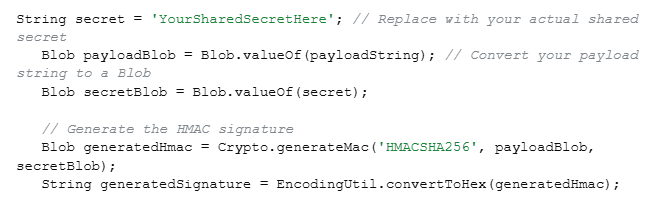
- Now, we compare the signature received in the request with the newly generated one.
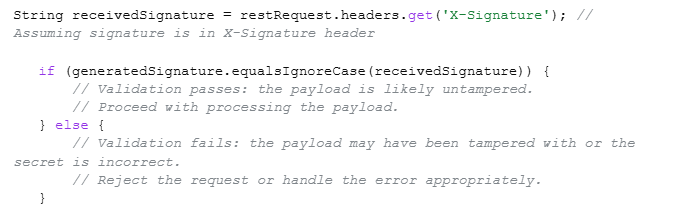
- Matching signatures validates the request and is a green signal to trust and process the payload. However, unmatched signatures indicate to reject the request to fail tampering and incorrect shared secret.
This way, we can be sure that the original sender has raised the request and no one has modified it.
2. During JWT authentication, what are the common causes of “invalid signature,” and how would you debug them?
Answer: Some common causes of “invalid signature” can be:
- Mismatch of the secret key between Salesforce and the identity provider.
- An incorrect or a mistake in the JWT header or claim formatting.
- Encoding of incorrect Base64Url.
- Clock drift between Salesforce server time and provider time.
- Using HMAC instead of RSA (or vice versa).
- Trailing spaces or hidden characters in the token.
- To debug, we need to rebuild the JWT manually using Apex and compare it with working tokens.
- Log decoded headers & claims using:
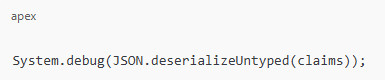
- Verify whether the exp, aud, and iss match according to the expectations of the providers.
- Use JWT.io to compare your signature with the provider.
- For further details, we can enable “Debug Logs → Apex Callouts”.
3. You have to send confirmation emails to 1 M Contacts after a data migration. How would you design this without hitting limits?
Answer: Apex can’t send large-scale emails directly due to limitations.
So, to create a design without hitting limits, we need to follow the steps below:
- At the enterprise level, the most suitable is Salesforce Marketing Cloud or Marketing Cloud Connect.
- Also, we can apply the Single Email Message with Batch Apex and Email Relay.
- To design batches, we must keep 200 emails in every Batch, this way, we will only need 5,000 total batches, and then we can use the Database. Stateful to track the failures easily.
- We can use platform events and an external email service, such as SendGrid or Mailgum, for offloading extremely large email sends. Then the retry baked-in mechanism.
- To avoid sending double emails to contacts, we will store the “email sent” status to keep track.
This process can help guarantee scalability and avoid hitting governor limits.
Section 2: Integration & Reliability
4. If we need to avoid processing the same request twice, how will you handle the duplicate webhook in Apex?
Answer: We will go to the webhook request header and look for a unique identifier which will help to extract a webhook event ID effortlessly. Then we need to restore it so we will use Custom Object or Custom Metadata Cache for it.
For faster lookups, we can use Platform Cache, Before processing, check whether the event ID exists. If yes → skip.
Apex example:
if (WebhookEvent__c.get(eventId) != null) {
return; // duplicate
}
We can ensure reliability by always designing webhook handlers as idempotent.
5. How will you manage the partial failures that Apex receives as per thousands of records per request received, ensuring no data loss?
Answer: First thing that we should do is to accept all records then immediately return a tracking ID and insert records using Queueable Apex or Batch Apex. For partial save, we use the Database.insert(records, allOrNone=false).
Collect failed results and store them in a custom object:
- API Request ID
- Failed record data
- Error message
Build a retry process via:
- Another Batch job OR
- A scheduled job that picks failed rows.
Return structure to caller:
{
“requestId”: “api_2025_3344”,
“status”: “ACCEPTED”
}
This process avoids timeouts even during partial failures and saves records.
6. How would you ensure delivery if Salesforce sent data to an external API that goes down intermittently and is back online?
Answer: This is a classic resilient outbound integration problem. We can start by publishing your outbound payload as a Platform Event, and triggering it will send the callout. We can create a custom object in a retry query to store payload and error, using a Scheduled Apex Job so we can retry failed records every X minutes.
Additionally, we can add exponential back up that will retry failed records in every 3, 9, 12, 15.. minutes, helpful to complete data delivery even if the external API is offline for a long time.
Section 3: Authentication & Security
7. How do you handle external API’s SSL certificate rotation that happens every 3 months? How will you make it automatic in Salesforce?
Answer: Salesforce has an automatic process of validating API SSL certifications and even notifies if any of them are missing in the Remote site settings or named credentials chain. If we get any notification, we can start with Named credentials to manage the rotation first. So, we just have to take care if the external service uses a valid CA-signed certificate, as Salesforce will take care of SSL root and other certificates automatically. Also, we can utilize the Certificate Pinning for the changes noticed in the external service domain or certificate chain.
8. If a third-party only supports OAuth 2.0 Authorization Code Flow, how will you integrate it with Salesforce? You have to authenticate it without manual user consent?
Answer: Without ongoing user consent, we need server-to-server access when a 3rd party only supports OAuth 2.0 Authorization Code Flow. We can obtain a refresh token by following the correct approach of one-time authorization with an admin. Then follow the simple steps:
Register Salesforce Callback URL with the provider > Run the normal authorization URL > Manual log in > Keep 3rd party shared authorization code and refresh token.
Afterwards, to automatically exchange the token for new access tokens without further human involvement in Salesforce, we need to store the refresh token inside a Named Credential securely. This way, callouts use the Named Credential every time and backstage, refresh token injects valid access tokens with the help of Salesforce. OAuth’s Authorization Code Flow needs minimum of one initial consent, but we can make the integration server-to-server & automatic with a refresh token.
9. How would you generate and refresh tokens securely from Apex if your external service uses JWT-based authentication?
Answer: We can get started with JWT header and claims (iss, sub, aud, exp) creation and signing up with a private key stored in a certificate in Salesforce.
Then generate a JWT:
Blob signature = Crypto.sign(‘RSA-SHA256’, Blob.valueOf(jwtHeader + ‘.’ + jwtClaim), cert.getPrivateKey());
Now, we will use platform cache & named credentials to post JWT to token endpoint and parse. This secures the access token, and we can even use Token exchange to set up an auto-refresh to update when expired.’’
Salesforce should not generate or sign JWTs as we are using middleware to securely handle JWT- based authentication so MuleSoft (Middleware) manages all JWT signing, token generation, and refresh cycles. It ensures that private keys never enter Salesforce. So, Salesforce Apex calls Mulesoft via Named credentials and gets an access token generated already. Salesforces help in storing this token information and expiration date temporarily in the Platform Cache or an encrypted field. Apex does not perform any cryptographic operations when the token expires; instead, it simply requests a new one from Mulesoft. It works in a pattern where all callouts include the token in the Authorization header, and 401/403 responses trigger an automatic refresh request that centralizes security in MuleSoft, reduces Apex complexity, and avoids exposing private keys in Salesforce.
Section 4: Bulk Data, Scalability, & Async Processing
10. How to design Apex code that processes 5 million records?
Answer: To efficiently handle such a large result set, like 5 million records in Apex, we can use Batch Apex with Database.getQueryLocator. We have to stay within CPU, heap, and callout limits, so we will keep the batch scope around 2000. Retrying can corrupt the data, so we have to bulkify the logic fully to keep them idempotent. Keep 4 things in mind while following this process:
Keep SELECT fields usage minimal
Don’t use heavy computation in loops
Try performing DML in bulk
Capture partial failure with error logging (Custom Object or Platform Events)
Also, we can run multiple parallel batches on a disjoint set and even use data partitions, like CreatedDate ranges,etc, to speed up the process. Use AsyncApexJob to monitor performance and for selectivity, optimize queries with indexes.
11. How can we Bulkify REST API callouts?
Answer: We have 4 ways to Bulkify Callouts:
- Batch up records, and to avoid hitting governor limits, we need to process them in separate Queueable Apex jobs.
- Send a single payload of record IDs to a middleware. It helps in processing and interacting with external systems.
- Use an external system to process the records bya separate service. Just add the necessary details to the platform event and publish.
- Keeping the current transaction in mind, implement logic for throttling API Requests.
12. How do you handle row locking issues (UNABLE_TO_LOCK_ROW)?
Answer: We can use parent ID to sort DML records and lock queries using FOR UPDATE. Also, we can use Limits.getDmlRows or Limits.getCpuTime to retry logic and avoid multiple parents in one transaction.
Section 5: System Design, Patterns & Best Practices
13. What is the best way to implement idempotent Apex logic?
Answer: To implement Idempotent design, we need to process the same request more than 2 times to get the same result. There are 4 ways to do this:
- Keep the expertanal ID unique
- Save request hash and avoid duplicates
- Utilize Platform Cache to use a lock system (Key = requestID).
- Always perform “incremental updates” after the thorough check up.
14. How do you design a multi-org integration hub connecting multiple Salesforce orgs?
Answer: We can use both Salesforce Event Bus (Platform Events) or Mulesoft / Integration Middleware. Each org publishes & subscribes to events that include routing rules, retry logic, dead-letter queue, and event versioning
15. How do you ensure transaction consistency across multiple async processes?
Answer: Follow these 5 simple steps to ensure transaction consistency across multiple async processes.
- Process the order with Platform Events
- Avoid race conditions by applying “FOR UPDATE” row-level locking
- Implement state-based processing like state machines
- Handle retries safely with idempotency
- Coordinate multiple async processes with the Orchestration layer.
16. How do you protect Apex REST APIs from DDoS attacks or spam traffic?
Answer: We can use API keys and HMAC signature,s and Platform Cache counters to add rate limiting. Then we can Shield Event Monitoring to block IPs. Also, we can use AWS API Gateway or Cloudflare to add a reverse proxy.
17. How do you handle schema changes (new fields, deleted fields) in Apex so the system does not break?
Answer: We need to avoid hardcoded field names, using Schema.DescribeFieldResult and Custom Metadata for dynamic mapping. Also, we need to add automated tests to detect schema drift and utilize Dynamic SOQL to create flexible queries at runtime or Dynamic DML to create and manipulate records with fields or values that are unknown until runtime.
Conclusion
Hope these Salesforce Developer Interview Questions will add some confidence and knowledge to your basket. Also, you will get a glimpse of your preparation level according to the types of questions and scenarios asked during the interview. If you think you lack somewhere and need more training or practice to become an expert, this is your time to join our online Salesforce developer classes and get started to achieve great heights. We have instructors with years of experience and expertise in different sides of Salesforce. Also, you can get practical knowledge by working on live projects. And the bonus is that you can get placement assistance from our partnered organizations that look for expertise in different sectors of Salesforce.